
Why Manual Lead Capture Is Costing You Customers
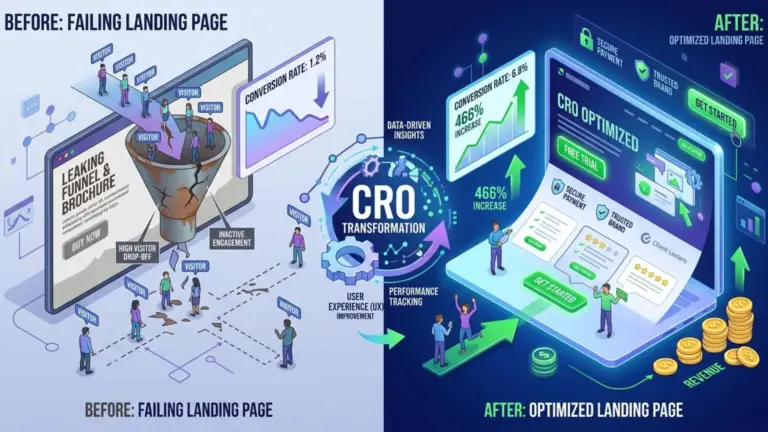
Every day, businesses lose potential customers for a simple reason: nobody was available to answer a question at the exact moment it was asked. A visitor lands on your website, hesitates, looks for a contact form buried on a secondary page, and leaves. That missed opportunity rarely shows up in your analytics as a failure, but it absolutely shows up in your revenue. This is where automatización con IA stops being a buzzword and becomes a practical solution that works while you sleep.
Table of Contents
- Why Manual Lead Capture Is Costing You Customers
- What AI Chatbots and Smart Forms Actually Do
- The Core Benefits for WordPress Sites
- Setting Up AI Chatbots on WordPress
- Choosing the Right Chatbot Solution
- Training Your Chatbot to Qualify Leads
- Building Smart Forms That Convert
- Conditional Logic and Progressive Profiling
- Connecting Forms to Automation Tools
- Combining Chatbots and Smart Forms for Maximum Impact
- Measuring What Works
- Best Practices for Sustainable Lead Automation
- Start Automating Your Lead Generation Today
AI chatbots and smart forms have changed the way WordPress sites capture and qualify leads. Instead of waiting for a prospect to fill out a static form and hope for the best, modern automation tools engage visitors instantly, ask the right questions, and route qualified leads directly into your CRM or inbox. In this article, we will explore how to build a lead generation system on WordPress that runs on autopilot, without sacrificing the human touch that converts curious visitors into paying customers.
What AI Chatbots and Smart Forms Actually Do
Before diving into implementation, it helps to understand what these tools are and why they outperform traditional contact forms. A chatbot is not just a popup with canned answers. Modern chatbots para web use natural language processing to understand intent, answer questions, and guide visitors toward a specific action, whether that is booking a call, requesting a quote, or downloading a resource.
Smart forms take a different but complementary approach. Unlike a generic contact form with fields for name, email, and message, formularios inteligentes adapt based on user behavior. They can show different fields depending on the page, the traffic source, or the answers a visitor has already given. This personalization dramatically increases completion rates because visitors only see questions relevant to them.
The Core Benefits for WordPress Sites
- Immediate engagement: visitors get answers in seconds, not hours.
- Qualification in real time: leads are scored before they reach your sales team.
- Data capture without friction: progressive profiling collects information over multiple visits.
- Integration with your stack: leads flow automatically into email marketing, CRM, or booking systems.
- Consistent follow-up: automated sequences nurture leads even when your team is offline.
Setting Up AI Chatbots on WordPress
WordPress offers several ways to deploy a chatbot, ranging from lightweight plugins to fully custom integrations with external AI platforms. The right choice depends on your budget, technical resources, and how complex your lead qualification process is.
Choosing the Right Chatbot Solution
For most small and medium businesses, a plugin-based solution is the fastest path. Tools like Tidio, Chatbot.com, or Intercom offer WordPress integrations that require no coding. They connect to OpenAI or similar language models, allowing you to train the bot on your own content, FAQs, and service descriptions. If you run a hotel, for example, the chatbot can answer questions about availability, amenities, and local attractions while collecting the visitor’s email for follow-up.
For agencies and businesses with more complex needs, a custom integration using the OpenAI API gives you full control over conversation flow, branding, and data handling. This approach requires developer involvement but pays off when lead qualification is central to your revenue model.
Training Your Chatbot to Qualify Leads
A chatbot is only as good as the knowledge you feed it. Start by mapping out the most common questions your sales team receives and the answers that move prospects forward. Then define a qualification flow: what does a good lead look like, and which questions reveal that? For a service business, this might be budget range, timeline, and location. For a tourism brand, it might be travel dates, group size, and preferred experience type.
The goal is not to interrogate visitors but to have a natural conversation that ends with a clear next step. When the chatbot detects a qualified lead, it should trigger an automatic action: sending the contact details to your CRM, booking a call, or delivering a personalized proposal.
Building Smart Forms That Convert
Smart forms are the quiet workhorses of leads automáticos. While chatbots handle real-time conversations, forms capture structured data that feeds your marketing and sales pipelines. The key is to make them adaptive and intelligent rather than static and forgettable.
Conditional Logic and Progressive Profiling
Conditional logic allows a form to change based on user input. If a visitor selects “I need a website redesign,” the form can then ask about their current platform, budget, and timeline. If they select “I need ongoing maintenance,” the questions shift accordingly. This relevance keeps visitors engaged and reduces abandonment.
Progressive profiling takes this further by collecting information over time. The first interaction might only ask for an email. On the second visit, the form asks for company size. On the third, it asks about specific pain points. Each interaction feels light, but together they build a rich lead profile without overwhelming anyone.
Connecting Forms to Automation Tools
The real power of smart forms emerges when they connect to automation platforms like Zapier, Make, or n8n. A form submission can trigger a sequence of actions: adding the lead to your email list, creating a task for your sales team, sending a personalized welcome email, and scheduling a follow-up reminder. This is where automatización con IA delivers measurable time savings and consistency.
On WordPress, plugins like Gravity Forms, Fluent Forms, and WPForms support conditional logic and integrations out of the box. Pair them with an AI layer, such as an AI-powered form plugin or a custom webhook, and you have a system that not only collects leads but also scores and routes them intelligently.
Combining Chatbots and Smart Forms for Maximum Impact
Chatbots and smart forms are not competitors. Used together, they create a seamless lead capture experience. A chatbot can engage a visitor immediately, answer their initial questions, and then hand them off to a smart form pre-filled with the information already gathered. This reduces friction and increases completion rates significantly.
Consider a scenario in the hospitality industry. A visitor asks the chatbot about availability for a specific weekend. The chatbot confirms availability, captures the visitor’s email, and then presents a smart form pre-populated with the dates and party size. The visitor only needs to confirm their details and submit. What could have been a multi-step, high-friction process becomes a single, fluid interaction.
Measuring What Works
Automation without measurement is guesswork. Track conversion rates at each stage: chatbot engagement rate, form completion rate, lead quality score, and eventual conversion to customer. Use this data to refine your chatbot scripts and form logic. Small adjustments, such as changing the first question or reducing the number of fields, can have a dramatic impact on results.
Best Practices for Sustainable Lead Automation
Automation should enhance the customer experience, not replace it. Always give visitors a clear path to a human if they need one. Keep your chatbot’s tone consistent with your brand. Ensure your forms comply with privacy regulations like GDPR by including clear consent language and offering easy opt-out options.
Also, remember that AI is a tool, not a strategy. The most effective lead generation systems combine intelligent automation with genuine value. Offer something worth exchanging an email for: a useful guide, a personalized quote, or a genuine answer to a real question. When automation serves the visitor’s needs first, conversions follow naturally.
Start Automating Your Lead Generation Today
Manual lead capture is no longer sustainable in a world where visitors expect instant answers and personalized experiences. By combining chatbots para web with formularios inteligentes, WordPress site owners can capture leads automáticos around the clock, qualify them intelligently, and route them to the right place without lifting a finger. The technology is accessible, the integrations are mature, and the results speak for themselves.
If you are ready to stop losing leads to slow response times and static forms, start with one small step today. Install a chatbot plugin, build a smart form with conditional logic, or connect your existing forms to an automation platform. Then measure, refine, and scale. Your future customers are already on your website. Make sure something is there to welcome them.